WordPress vs Static HTML: Which Is Actually Better for SEO in 2026?
By Tim Francis · April 15, 2026 · 10 min read
Quick Answer
For local service businesses, static HTML is objectively superior to WordPress for SEO in 2026. Static sites load in under one second, score 95 to 100 on Core Web Vitals, require no security patches, and eliminate the plugin dependencies that slow WordPress sites down. WordPress remains the right choice for ecommerce, membership sites, and platforms requiring user-generated content.
Key Takeaways
- WordPress sites average 3 to 5 second load times on mobile; static HTML sites routinely load in under one second.
- Core Web Vitals scores are a confirmed Google ranking factor — and static HTML sites pass them by default.
- WordPress plugins are the primary attack vector for hacked websites; static HTML has no server-side code to exploit.
- WordPress requires constant updates to core, themes, and plugins; static HTML sites are genuinely set-and-forget.
- For local service businesses, static HTML delivers meaningfully better SEO results at a lower long-term cost.
- WordPress is the right tool for ecommerce, user-generated content, and complex web applications.
- At Search Scale AI, we build every client site in static HTML specifically because it gives our clients an unfair SEO advantage.
The Question Every Business Owner Asks Me
When I sit down with a new client at Search Scale AI, one of the first questions I get — especially from business owners who have done some research — is: Should my website be on WordPress or something else? In my 30 years of experience building and optimizing websites, I've worked extensively with both. And in 2026, I have a very clear answer that I'm going to give you straight, without the hedging you'll get from most agencies.
The answer depends on what your business actually needs — but for the vast majority of local service businesses, static HTML wins. Not marginally. Decisively. Let me show you the data and let you reach your own conclusion.
Page Speed: The Most Critical SEO Factor in 2026
Let's start with the most important metric: how fast your website loads. This is where the gap between WordPress and static HTML is most stark and most consequential for SEO.
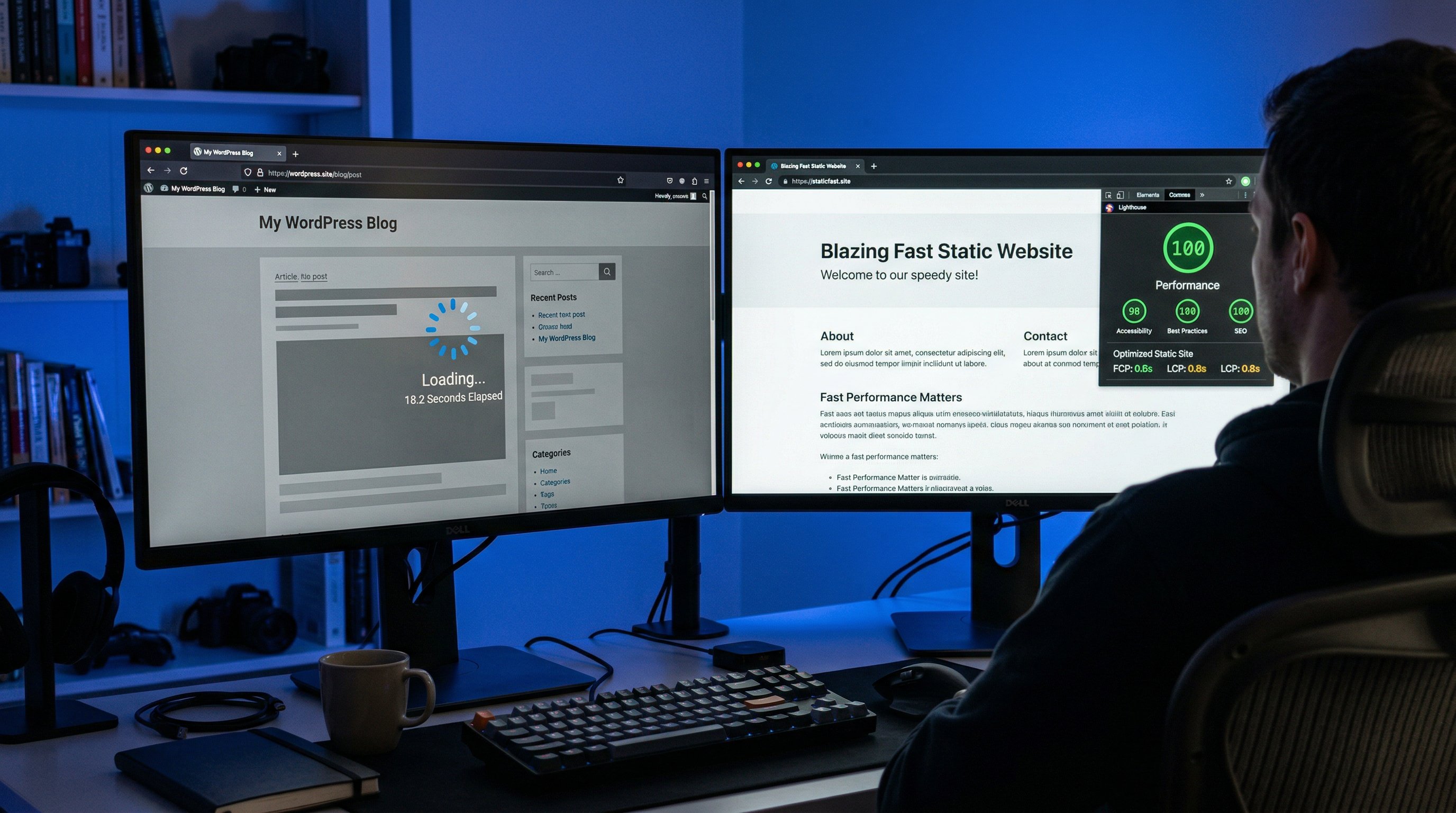
The average WordPress website loads in 3.5 to 5 seconds on mobile, according to data from multiple independent speed testing platforms. This is not a fringe finding — it reflects the reality of WordPress's architecture. Every time someone visits a WordPress page, the server has to query a database, process PHP code, load the active theme, execute plugin logic, and then assemble and deliver the HTML to the visitor's browser. Even with good hosting, this takes time. With budget hosting, it can take 6 to 8 seconds or more.
A well-built static HTML site — which is simply pre-rendered HTML files delivered directly from a CDN — loads in 0.4 to 0.9 seconds. There is no database query, no PHP execution, no plugin stack to run. The server just delivers a file. It's the fastest possible way to serve a web page, and the performance difference is not subtle.
Why does this matter for getting on Google's first page? Because Google has made page speed a confirmed ranking factor since 2010, and with the introduction of Core Web Vitals as ranking signals in 2021, that commitment has only deepened. A slow WordPress site isn't just losing visitors — it's actively being demoted in Google's rankings in favor of faster competitors.
Core Web Vitals: Where WordPress Struggles and Static HTML Excels
Google's Core Web Vitals — Largest Contentful Paint (LCP), Cumulative Layout Shift (CLS), and Interaction to Next Paint (INP) — are the specific metrics Google uses to evaluate page experience. Let me tell you what I see consistently when I run audits.
WordPress sites, especially those using page builders like Elementor or Divi, routinely fail Core Web Vitals. The most common culprits are render-blocking JavaScript and CSS from plugins, oversized images that haven't been properly optimized, and slow server response times from shared hosting. I audit sites for clients in Orlando, Miami, and Tampa regularly, and the pattern is consistent: WordPress sites score 40 to 65 on mobile PageSpeed, with failing LCP and CLS metrics.
Static HTML sites built on clean code with proper image optimization routinely score 95 to 100 on PageSpeed Insights across all metrics. They pass Core Web Vitals by default because there is simply nothing to slow them down. No plugin conflicts, no bloated theme frameworks, no external script calls from a half-dozen third-party services. This is the technical foundation of our web design service at Search Scale AI, and it is why our clients' sites consistently outperform the competition in organic search.
Security: An Underrated SEO Factor
Most people don't think of security as an SEO issue. But a hacked website gets blacklisted by Google almost immediately, which means you disappear from search results entirely until the issue is resolved, reviewed, and cleared — a process that can take weeks or months.
WordPress is the most hacked CMS on the internet, not because it's inherently insecure, but because of scale and plugin proliferation. With over 60,000 plugins in the WordPress repository, many of them poorly maintained, vulnerabilities are discovered constantly. A business owner who installs a plugin and then forgets to update it for three months is one exploit away from a complete site compromise.
Static HTML has no server-side code. There is nothing to hack in the traditional sense. You cannot inject malware into a flat HTML file served from a CDN. There are no database credentials to steal, no admin login page to brute-force, and no PHP vulnerabilities to exploit. From a security standpoint, static HTML is categorically safer — and that security advantage translates directly into SEO stability.
Maintenance: The Hidden Cost of WordPress
WordPress requires ongoing maintenance that most business owners dramatically underestimate. WordPress core updates, theme updates, and plugin updates happen constantly — and they don't always play nicely with each other. A plugin update that breaks your contact form or white-screens your homepage is a genuine business emergency, not a minor inconvenience.
I've seen businesses in Jacksonville and Fort Lauderdale lose weeks of traffic because a plugin conflict took their site down and their web developer took five days to respond. Every day a site is down or broken is a day of lost leads and declining rankings.
Static HTML sites, by contrast, are genuinely set-and-forget. Once built, they require no maintenance updates. The HTML doesn't get outdated. There are no plugin vulnerabilities to patch. The hosting infrastructure — typically a CDN — handles uptime automatically with 99.99% availability guarantees. When I build a static site for a client, I'm not selling them a site that needs monthly babysitting. I'm building them a durable digital asset.
SEO Plugin Dependency: A WordPress Crutch
One of the most commonly cited advantages of WordPress for SEO is the availability of plugins like Yoast SEO and Rank Math. These tools are genuinely useful — they make it easier to set meta titles, descriptions, sitemaps, and canonical tags without writing code. But they also reinforce a troubling dependency.
WordPress site owners often believe that having Yoast installed means their site is "SEO'd." It isn't. Yoast helps with on-page configuration, but it cannot fix a slow server, a broken mobile experience, or thin content. And the plugin itself adds JavaScript to every page load, contributing to the very performance problems that hurt rankings.
With static HTML, SEO configuration is built directly into the code — meta tags, Open Graph tags, canonical tags, and structured data are all baked in at build time. There are no plugins to configure, no plugin conflicts to resolve, and no additional page weight from SEO software. The result is a leaner, faster site that performs better on the metrics that actually drive rankings.
When WordPress Actually Makes Sense
I want to be fair here, because WordPress is not a bad product. It's an exceptional product for the right use cases.
If you're building an ecommerce store that needs WooCommerce, product inventory management, and customer accounts, WordPress is a strong choice. If you're running a membership site with gated content and user roles, WordPress handles that well. If you need a complex web application with user-generated content, forms, and dynamic data, a headless WordPress setup or traditional WordPress installation may be the right tool.
But if you're a service business — a contractor, a law firm, a dental practice, a restaurant, a real estate agent — you almost certainly don't need any of those features. You need a fast, beautiful website that ranks well, loads instantly on mobile, and converts visitors into leads. For that use case, static HTML is not just better — it's objectively superior, and I don't say that lightly after three decades in this industry.
Hosting Costs and Scalability
WordPress sites typically require managed WordPress hosting that costs anywhere from $30 to $100 per month for a small business site on a reputable host like WP Engine or Kinsta. Budget hosting on Bluehost or GoDaddy at $10 per month will deliver slow, unreliable performance that directly hurts your SEO results.
Static HTML sites can be hosted on platforms like Netlify, Cloudflare Pages, or AWS CloudFront for a fraction of that cost — often under $5 per month, and sometimes free for small sites. The CDN infrastructure these platforms use delivers your site from servers physically close to each visitor, reducing latency globally. There's no trade-off between cost and performance — static hosting is simultaneously cheaper and faster than managed WordPress hosting.
Our Decision at Search Scale AI
At Search Scale AI, we made a deliberate decision to build all of our client websites in static HTML precisely because of everything I've described above. When a client comes to us for web design, we're not just building them a pretty site — we're building them a technical foundation that gives their SEO campaign an unfair advantage from day one.
Our clients in St. Augustine, Sarasota, Cape Coral, and across Florida consistently outperform their WordPress competitors on Core Web Vitals, page speed, and ultimately on rankings. That's not a coincidence — it's the predictable result of building on a superior technical foundation. If you want to see what we mean, read our case study on how we build and rank websites in under 48 hours.
Frequently Asked Questions
Can I rank well on Google with a WordPress site?
Yes, absolutely. Thousands of businesses rank well with WordPress sites. The point is that with the same content and the same SEO effort, a fast static HTML site will consistently outperform a slow WordPress site. WordPress is a viable path — it's just not the optimal one for most local businesses.
Is it possible to make a WordPress site fast enough to compete?
With significant investment in premium hosting, a lightweight theme, aggressive caching, a CDN, and meticulous plugin management, you can get a WordPress site to load in 1.5 to 2 seconds — which is competitive. But this requires expertise, ongoing maintenance, and meaningful cost. A static HTML site achieves better speeds with less effort and lower cost.
What about page builders like Elementor or Divi — are they bad for SEO?
Page builders are convenient for non-developers, but they add substantial JavaScript and CSS bloat to every page. Sites built with Elementor or Divi routinely fail Core Web Vitals. If you're using a page builder and struggling with slow scores, that's likely a significant contributing factor.
Does Search Scale AI migrate WordPress sites to static HTML?
Yes. We regularly migrate existing WordPress sites to static HTML as part of our SEO rebuild projects. The migration process preserves your existing content and URLs, so you don't lose your ranking history, while dramatically improving your technical SEO performance.
What is a headless WordPress setup, and does it solve the speed problem?
A headless WordPress setup uses WordPress as a backend content management system while delivering the front end as a static or server-rendered application. Done correctly, it can achieve speeds comparable to static HTML. However, it is significantly more complex and expensive to build and maintain than a straightforward static HTML site.
If I already have WordPress, should I switch immediately?
Not necessarily immediately, but it's worth a serious evaluation. If your PageSpeed score is below 70, your Core Web Vitals are failing, or your site loads in more than 3 seconds on mobile, the performance gap is actively costing you rankings and leads. In those cases, a rebuild typically delivers a strong ROI within 6 to 12 months through increased organic traffic.